

Phone Tree Meaning: Setup Guide & Best Practices

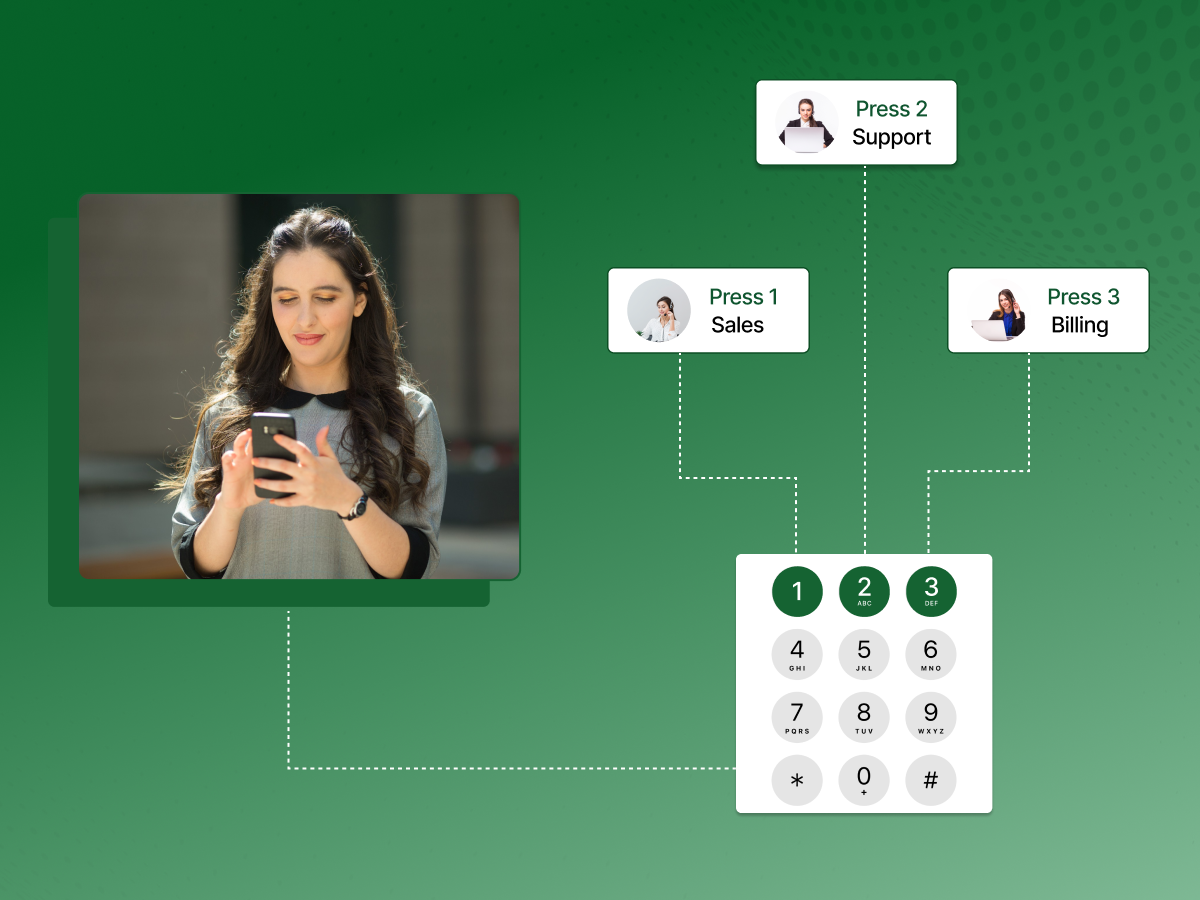
Ever called a business and got stuck in a never-ending list of options? “Press 1 for this, press 2 for that, press 3 to question your life choices.” We’ve all been there.
But here’s the thing: phone trees don’t have to suck. When designed well, they actually help customers reach the right person faster, rather than wandering through endless options.
The difference between a frustrating phone tree and one that works comes down to knowing what you’re doing.
This blog explains the phone tree meaning and shows you exactly how to build a system people won’t hate calling.
Let’s clarify the phone tree meaning first: a phone tree picks up your calls and sends them to the right place. Someone calls, hears “Press 1 for Sales, Press 2 for Support,” and makes their choice. The system does the rest.
It handles several inbound calls at once, so people don’t sit on hold forever. It works day and night without needing someone at a desk. Most companies use phone trees because they’re cheaper than hiring receptionists and quicker than manual transfers.
The recorded message lists your menu options, and callers press buttons until they get where they’re going. Nothing fancy, just practical call routing that keeps your phone system running smoothly.
Understanding the phone tree meaning helps you design better systems. Now let’s explore how one works.
Knowing the actual operation process of phone trees will enable you to create better systems and resolve the problems more efficiently.
Let’s understand the process first:
Someone calls. Your system answers with a recorded message. “Thanks for calling ABC Company. Press 1 for sales, 2 for support.” That’s it.
Callers press numbers on their keypad. Some newer systems take voice commands too. The phone tree picks up what they want and moves them along.
Press 2 for support? You go to support. No transfers, no waiting for someone to figure out where you belong. The automated phone system does it instantly.
Sometimes you need layers. Support might split into technical help or account questions. That’s fine, but keep it to two levels maximum. Three gets annoying fast.
Always give people a way out. “Press 0 to speak with someone” saves the day when menu options don’t fit. Your auto attendant handles the simple stuff, but humans stay available for everything else. That balance matters.
That’s the basic flow: the caller dials, the system answers, options branch out, and calls land where they should, all happening in seconds without human intervention.
Understanding how a phone tree operates sets the stage for seeing how it can boost efficiency and deliver real financial benefits to your business.
To understand the auto attendant in detail, read: Auto Attendant Explained: Features, Benefits, and Best Practices
A HubSpot study reports that 82% of customers say a quick response or clear communication improves their perception of a business. A well-planned phone tree helps teams share updates faster and avoid the chaos that comes with missed messages.
It keeps communication steady, even when phones ring nonstop or staff feel stretched.
Efficient Communication Management: Your phone lines stay clear. Instead of one receptionist juggling ten calls, the system handles hundreds simultaneously. Inbound calls get sorted instantly, and nobody hears “all our lines are busy.” It’s like having an extra set of hands that never gets tired.
Improved Customer Service: People hate waiting. A phone tree cuts wait times dramatically because calls land in the right place from the start. No more “let me transfer you” three times. Customers get answers faster, which means they’re happier. Simple math.
Rapid Response in Emergencies: When something goes wrong, a system outage, a safety issue, your emergency notification system kicks in immediately. Send alerts through automated phone calls to everyone who needs to know. No sitting there dialing numbers manually while the clock ticks.
Enhanced Internal Coordination and Productivity: Your team stops playing phone tag. Automated skill-based call routing means salespeople get sales calls, and support handles support issues. Nobody’s interrupted for questions meant for someone else. People actually get work done.
Professional Image: A polished recorded message beats “umm, hold on” every time. Even small businesses sound established with a proper phone system. First impressions count, and callers notice.
Scalability and Flexibility: Is the company growing? Your phone tree grows with you. Add departments, change menu options, update hours, all without rewiring anything. Cloud-based systems make it even easier.
Cost Reduction: Here’s the bottom line: automated phone trees cost less than hiring receptionists. One system replaces multiple salaries, benefits, and desk spaces. Companies typically save 30-50% on phone handling costs within the first year.
Increased Sales and Customer Loyalty: Faster service means more closed deals. When callers reach sales quickly instead of hanging up in frustration, your conversion rate climbs. Happy customers also stick around longer and spend more over time.
Optimized Staff Resources: Your people handle complex issues while the system manages routine questions. That’s a better use of talent and payroll. Instead of answering “what are your hours” fifty times daily, your team focuses on actual problems.
Better Call Management: Track everything. Which menu options get used most? When do calls spike? This data helps you staff properly and adjust your phone tree template to match real demand. Less guesswork, better decisions.
Therefore, when used thoughtfully, a phone tree supports smoother operations and creates long-term savings for any busy workplace.
Now that you know its benefits, it’s important to plan carefully. Our phone tree implementation checklist shows exactly what to include and what to avoid.
Getting your phone tree right can make the difference between frustrated callers and customers who reach help quickly. Here’s a practical guide to what really matters.
Your greeting sets the tone. Keep it short and actionable.
“Thanks for calling [Company Name]. Press 1 for sales, 2 for support, 3 for billing.”
This beats a long-winded corporate spiel every time. Use automated phone tree system options to get callers to the right place fast, leaving marketing pitches for later.
Design your call flow as a first-time caller would. Common options, sales, and support go first, grouped logically. Keep menus to 4–5 choices. Use sub-menus only if necessary, and limit destinations to three button presses. This mirrors best practices for using call systems efficiently.
Some callers know exactly who they need. Allow direct dialing of names or extensions. This saves time, especially for regular clients, and improves local phone accessibility. Keep directories updated to avoid dead ends.
Always provide a safety exit. Callers in urgent situations should press 0 to reach a human operator. Even if the operator just routes calls, it beats forcing people through irrelevant menus. This is essential in incident response and emergency management scenarios.
Good voicemail integration routes after-hours calls automatically to the correct inbox. Sales calls to sales, support to support. Advanced systems can transcribe messages and send them via email. This feature supports data security and business continuity.
Set different greetings for nights, weekends, and holidays. Communicate return times and provide instructions for urgent matters. Some companies use mass notification system tools to broadcast updates via calls or texts.
Hold time happens. Avoid silence or annoying music. Use this opportunity for helpful content: self-service tips, current promotions, or voice broadcast updates. Keep volume reasonable and messages useful.
If many customers speak other languages, offer those choices upfront. “For English, press 1. Para español, oprima dos” right away shows respect. Don’t bury language options three menus deep. Multilingual support isn’t just nice, it’s legally required in some industries and locations.
A manual call tree or automated system generates valuable data. Track menu selections, abandoned calls, and hold times. Analytics reveal areas to improve and optimize your telephone trees for better service.
Overly Complex Menus: Menus that force callers through multiple sub-options frustrate customers. Keep it simple. Prioritize fast access to humans; sometimes that beats perfect categorization.
Using Internal Jargon: Avoid terms like “revenue operations” or “solution engineering.” Speak your customers’ language: sales, support, or billing.
Outdated Information: Stale greetings or disconnected numbers erode trust. Review templates for small businesses quarterly. Update hours, extensions, and time-sensitive messages.
Missing a “Go Back” Option: Callers make mistakes. Include a “press * to return to the previous menu” option. It prevents frustration and demonstrates thoughtful call flow design.
Robotic Voice: Even the best automated call systems can feel unnatural. Invest in professional voice recordings or high-quality voice synthesis. Warm, human-like voices improve perception.
Leaving Callers in Limbo: Never leave callers guessing. Provide estimated wait times, callbacks, or clear instructions. Uncertainty makes short waits feel endless. Integrate secure payments or self-service options if appropriate.
Phone trees work differently across industries. Here’s how businesses actually use them.
In customer service, phone trees ensure callers reach the right department fast. This improves call quality and retention, as studies show 91% of customers remain with a provider after a good service call.
Support teams use trees to triage urgency. Someone locked out of critical software jumps the queue. Feature questions get normal priority. Automation handles sorting, so humans solve problems instead of figuring out who needs help most.
Medical offices and salons have made it possible for customers to do their bookings, confirmations, or cancellations without having to play phone tag. “Press 1 to schedule, press 2 to confirm, press 3 for reception.”
Automated reminders are used to call patients two days before their appointments. “Press 1 to confirm, press 2 to reschedule.” This is a great way to reduce no-shows because people can reschedule their appointments.
Utilities use phone trees when things go wrong. Power outage? The system detects your address and immediately shares restoration time. These systems also handle mass notifications, hurricanes, and water advisories.
The tree calls everyone affected, and people press buttons to confirm receipt or request help.
Sales teams qualify interest before humans get involved. “Press 1 for enterprise, press 2 for small business, press 3 for pricing.” Hot leads reach reps immediately, while others enter automated follow-up.
Real estate agents give each property a unique number. Callers hear bedrooms, price, and open house times. Interested buyers press to connect, and agents already know which property caught their attention.
Banks call about suspicious charges. “Press 1 if you made this purchase, press 2 if this is fraud.” Confirmed fraud locks the card instantly.
Customers check balances, hear transactions, and make transfers, all without waiting. Only complex issues route to actual bankers, keeping hold times reasonable while offering 24/7 basic service.
Large companies route employees to the right department fast. HR questions, IT problems, facilities requests, each gets its own path. Nobody wastes time on multiple transfers.
IT helpdesks troubleshoot automatically. “Password not working? Press 1 for reset. The computer doesn’t start? Press 2 for troubleshooting.” Simple problems get solved without tickets. Complex issues reach techs with context about what failed.
HVAC companies, plumbers, and electricians confirm service appointments automatically. The system calls the day before. “We’re scheduled tomorrow at 2 PM. Press 1 to confirm, press 2 to reschedule.” Techs know customers expect them.
Payment collection works through trees, too. Utilities let customers pay over the phone by entering their account and card numbers. This keeps cash flow steady without staff processing payments all day.
These examples show how a phone tree adapts to different workflows and supports smoother communication, no matter the industry.
Exploring real-world examples helps to understand the different types of phone tree systems and which best fit various business needs. Let’s explore its types in our next section.
Not all phone tree systems work the same way. What fits your business depends on size, budget, and how your team actually operates.
1. Cloud-based Phone Systems: Everything runs through the internet with zero hardware in your office. You sign up, configure your phone tree through a web dashboard, and you’re operational. No servers to maintain, no technicians to call for changes.
These systems scale instantly. Updates happen automatically. Your team can access the system from anywhere with internet. A monthly subscription covers everything. It’s perfect for businesses wanting simplicity and flexibility without IT headaches.
2. VoIP Systems: VoIP converts calls into data traveling across your internet connection instead of traditional phone lines. Your phone tree lives in software, not physical equipment. VoIP cuts costs dramatically, with no per-line charges or long-distance fees.
Features like call recording, analytics, and CRM integration come standard. Agents use desk phones, computers, or mobile devices interchangeably. The technology powers most modern business communication because it just works better than old systems while costing less.
3. IP PBX Systems: IP PBX (Private Branch Exchange) gives you more control by running on servers you own, either on-site or in the cloud. Larger businesses prefer this when they need customization or have specific security requirements.
You get all the VoIP benefits, internet-based calling, advanced features, integration capabilities, but with your infrastructure. This means more setup complexity and maintenance responsibility, but also deeper control over how everything operates.
Good fit when you’ve got IT staff and need the system configured exactly your way.
4. Hybrid Phone Systems: Some businesses aren’t ready to ditch their existing phone infrastructure completely. Hybrid systems blend traditional phone lines with VoIP technology, letting you transition gradually.
Maybe you keep desk phones for the office, but add VoIP for remote workers. Or you maintain your current system while routing certain calls through internet-based services. This approach reduces risk during transitions and protects existing hardware investments.
5. Softphones: Softphone applications turn computers, tablets, and smartphones into full business phones. Employees install an app, log in, and suddenly their laptops make and receive calls through your phone tree system. No physical phones needed.
Remote teams operate identically to office staff. Agents see caller information, transfer calls, and access voicemail through software. Particularly useful for distributed teams, work-from-home setups, or businesses wanting to eliminate desk phone costs entirely.
With the right type of phone tree in place, businesses get a setup that fits their workflow and keeps communication steady every day.
Once you’ve chosen the right system, applying best practices helps optimize your phone tree for maximum efficiency and reliability.
Want to learn more about softphones? Here’s a guide: Softphone: What is it, Benefits, & How to Choose the Best One?
Getting your phone tree right takes ongoing attention and thoughtful design. Here’s what separates systems people tolerate from ones they actually don’t mind using.
Design User-friendly Phone Tree Menus: Stick to 4-5 options per menu. Talk like a normal person, not a corporate robot. Organize around what customers actually call about, not how your org chart looks.
Optimizing Call Routing for Efficiency: Smart routing checks caller ID, account history, and issue type before deciding where calls go. The goal is getting people to someone who can help on the first try.
Personalizing Caller Experiences with CRM Integration: When your phone tree talks to your CRM, agents already know who’s calling and why before picking up. Customers shouldn’t explain their entire history every single time.
A/B Testing Menu Options and Scripts: Try different menu wordings or voice tones and see what happens. Sometimes switching “press 1 for support” to “press 1 if something’s broken” changes how people navigate.
Monitoring Key Performance Indicators: Watch abandonment rates, hold times, resolution statistics, and which options people actually use. Numbers show you what’s annoying people before they complain.
Regular Updates Based on Customer Feedback: Pay attention to complaints and call recordings. Your phone tree shouldn’t stay the same forever; tweak it as your business changes, and customers tell you what’s frustrating.
Hence, when you follow simple design habits and refine them over time, your phone tree stays clear, fast, and easy for callers to navigate.
After designing and optimizing your phone tree, the next step is integrating it with your existing business tools for seamless communication.
Connecting your phone tree to existing software makes everything work smoother. Here’s the quick rundown on making it happen.
Figure out what you actually need. Screen pops showing customer info when calls come in? Automatic ticket creation in your helpdesk? Call logs syncing to your CRM? Smart routing based on agent skills? Pick what matters most for your operation.
Native integrations work out of the box if your provider supports your tools. Third-party connectors like Zapier bridge systems that don’t talk directly. Custom API development gives complete control but takes longer and costs more.
Native setups usually mean toggling settings and entering credentials. Third-party connectors need you to map fields between systems. Custom APIs require developer work to build exactly what you want.
Run test calls before going live. Make sure data flows correctly, nothing breaks, and your team understands how it works. Catch problems when they only affect testing, not real customers.
This way, integrating your phone tree with existing tools streamlines workflows, saves time, and keeps communication flowing effortlessly across your team.
Explore: How to Set Up a Phone Tree for Your Business: Free Templates
Now, you must be pretty clear about the phone tree meaning. Phone trees done right turn your business phone into an asset instead of a bottleneck. They route calls intelligently, cut wait times, and free your team to handle what actually needs human attention.
The difference between a phone tree people hate and one that works comes down to thoughtful design and regular tweaking based on real feedback. Start simple, test what works, and improve as you go.
Explore modern VoIP solutions like Dialaxy that make implementation easy and give you the flexibility to adapt as your business grows.
The purpose of a phone tree is to route incoming calls to the right
department or person automatically based on caller selections,
reducing wait times and improving efficiency.
Another name for a phone tree is auto-attendant, IVR (Interactive
Voice Response), or automated phone system.
Yes. Phone trees can forward calls to specific extensions,
departments, mobile numbers, or voicemail based on selections
or conditions.
Absolutely. Most businesses use them because they handle high
call volumes efficiently and provide 24/7 basic service without
staffing costs.
