

What Is a KSU Phone System? Definition, Benefits & How It Works

Ever pressed a blinking physical button to grab an incoming office call?
Congratulations, you’ve used a KSU phone system!
Long before cloud VoIP and virtual receptionists dominated the workplace, the Key System Unit (KSU) was the ultimate medium of business communications.
But what exactly is it, and why do some modern companies still rely on it today?
Whether you’re trying to decode confusing telecom jargon or figuring out the best upgrade path for your team, understanding this classic system is the perfect starting point.
Let’s break it down.
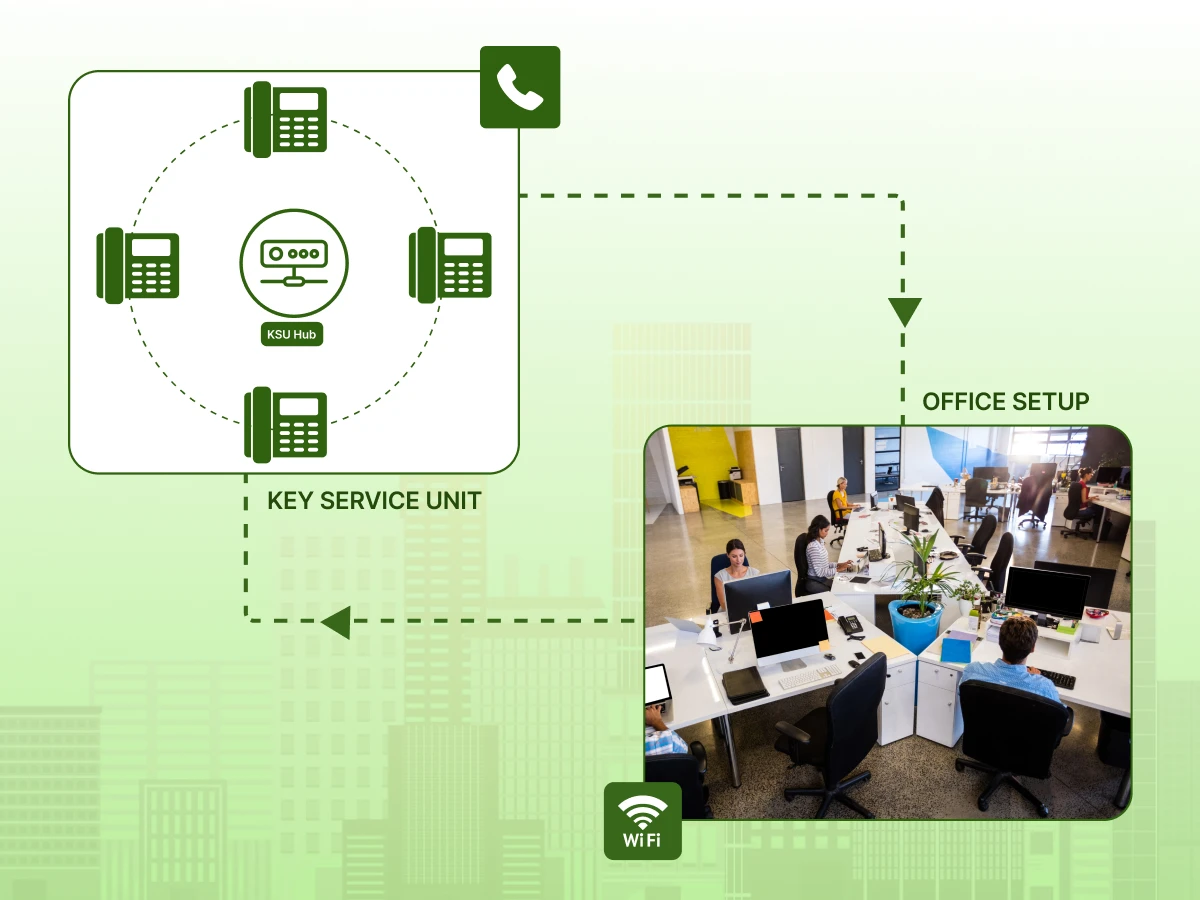
A key system unit (KSU), sometimes referred to as a key system unit, is essentially a telephony hardware system used to connect multiple telephone extensions to a few outside telephone lines.
Think back to the era when the public switched telephone network (PSTN) and traditional landline phones ruled the world. In those days, if you had 20 employees, buying 20 individual phone lines from the phone company was ridiculously expensive.
A Key system unit solved this problem. Small to mid‑sized companies could share phone lines among their staff without expensive equipment.
In essence, it’s a multi‑line business phone system designed to let offices manage inbound and outbound calls across multiple desks or phones without the headache of adding a separate dedicated line for every single user.
It bridges the gap between a basic home phone setup and a massive corporate private branch exchange (PBX). You might also hear about a “key service unit”, which is just another name for the exact same thing.
Additionally, there are KSU-less setups (or ksuless systems), which are smaller setups where the logic is built right into the phones themselves rather than a central box, but traditional key systems rely on that central hardware unit.
To really understand how a key phone system operates, imagine you are a traffic cop directing cars. The legacy phone system acts as that traffic cop for your phone lines.
In a traditional Key service unit phone system:
In a KSU PBX hybrid, you might get a mix of these features, but a pure legacy office phone system is beautifully simple. You push a button, you grab an outside line.
When you are exploring a system for startups or small businesses, comparing your options is essential. Below is a quick breakdown of how these different technologies stack up against each other.
| Feature | KSU | PBX | VoIP / Cloud Phone Systems |
|---|---|---|---|
| Hardware | On-premises | On-premises | Hosted or hybrid |
| Phone Lines | Physical lines | Physical or virtual | Internet protocol |
| Flexibility | Limited | Moderate | High |
| Advanced Routing | Basic | Advanced | Highly advanced |
| Scalability | Moderate | High | Very high |
Modern solutions like voice over internet protocol (VoIP) and internet protocol PBX (IP‑PBX) have completely changed the game. These systems use your existing internet connection.
Because they are internet-based, they offer robust features. For e.g., conference phones, automatic call recording, video conferencing, and voicemail transcription.
Yet, despite all the flashy add-ons of a hosted VoIP or cloud phone setup, a KSU’s simplicity and lower upfront cost can still appeal to certain businesses today. Sometimes, you just need a reliable office phone.
Now that you know what a key system unit is, let’s explore why businesses still value it today.
You might be thinking, why would anyone look at older tech when a shiny new desktop app or virtual phone exists? Well, traditional key systems actually pack a pretty powerful punch for the right type of office.
Let’s explore the benefits.
For many years, KSU systems were the go‑to business phone for budget‑conscious companies. Unlike some early PBX versions or expensive proprietary systems, a key system unit could handle multiple lines without hefty licensing or monthly software fees.
Today, if you want an essential plan for a small physical location, refurbished key service unit equipment can be a highly economical choice.
One of the absolute biggest perks of KSU phone systems is their incredible intuitiveness. You literally just press a button for Line 1, Line 2, or Line 3; that’s it. There are no confusing menus to navigate or software to log into.
Solving minor routing or dial issues rarely requires an IT technician. For employees who struggle with technology, the calling experience on these desk phones is as stress-free as it gets.
Since KSUs are entirely hardware‑centric, they don’t rely on internet connectivity to function. If your internet connection goes down, a VoIP phone system goes down with it.
Businesses that needed absolutely dependable phone uptime, especially before the widespread use of highly stable Internet Protocol VoIP, valued the simplicity and rock-solid durability of KSU phone systems.
Add a simple battery backup to the closet, and your business communications stay live even during a power outage.
While they certainly are not as scalable as cloud systems, KSU systems are perfectly capable of handling multiple extensions on a limited number of lines.
You can add a new VoIP desk phone or an analog phone here. Or you can plug in an extra line, all without having to rewrite your entire network security setup or reprogram the whole office.
KSUs offered plenty of great features right out of the box, including:
For many offices operating in the traditional PSTN era, this type of system provided more than enough edge to get the job done right.
Many companies invested in sturdy, reliable equipment, such as the famous Comdial DX120 key systems. These hardware units became legendary in the telecom world because they were known for incredibly long life and exceptionally low maintenance.
You install it, and it just works for a decade. Today, providers like Extreme Networks or Digium Sangoma focus on modern infrastructure, but the legacy of durable, physical-featured products still lives on in these older KSU boxes.
Believe it or not, it isn’t always an “either/or” situation. In modern hybrid environments, traditional KSUs can integrate with modern VoIP networks via special adapters or SIP gateways.
This acts as a bridge, letting businesses benefit from newer cloud‑based features like international calling, text messaging, or even a virtual receptionist, all without changing their existing hardware system.
Beyond the benefits, it’s important to see how key service units make sense financially for small and mid-sized offices.
Investing in a phone system is a lot more than just looking at the upfront price tag. Businesses need to carefully consider the total cost of ownership (TCO), long-term reliability, and the ultimate ROI.
Key System Units have historically been a cost-efficient choice for many small offices, especially when compared to complex PBX systems, cloud-based VoIP, or expensive hosted VoIP solutions.
Initial Unit Cost: One of the major advantages of this type of system is its raw affordability. The hardware system tends to be far less expensive up front than an advanced digital or enterprise cloud phone system, especially if you opt to purchase a refurbished model.
A company can easily set up a small office with multiple extensions without needing costly per-user software licenses or never-ending recurring cloud subscriptions.
For example, a refurbished Comdial DX120 unit can support 8–16 extensions for a tiny fraction of the price of a full IP-PBX deployment.
This makes KSUs an ideal match for businesses looking to maintain essential business telephone functionality without overextending their operating budget.
Per-User or Extension Cost: Unlike a modern VoIP phone system that may require a monthly paid license per user, KSU phone systems allow multiple users to share lines organically.
Each new extension you add is usually much cheaper than adding a full, dedicated telephone line from your phone company.
This setup is absolutely perfect for small business offices where staff only share a few lines. They don’t necessarily need advanced cloud-based features like a desktop app or an auto attendant for every single employee.
Installation Expenses: Installing a KSU phone system is a straightforward process. A telecom technician simply connects your business phones to the central key system unit using standard phone wiring. It often requires very minimal setup.
In contrast, installing a complex IP-PBX or a hosted VoIP system may require heavy software configuration, strict network security setup, router adjustments, and internet provisioning, all of which heavily increase your initial costs and require specialized IT help.
Maintenance and Repair Costs: Because they have fewer moving parts and require absolutely zero reliance on constant software updates, KSUs are wonderfully low-maintenance.
Hardware repairs, such as replacing a dead cordless phone battery or fixing a frayed desk phone line, are typically very inexpensive.
Compared to the frustrating, ongoing maintenance fees and maintenance charges you might face with managed cloud-based systems, a KSU keeps your recurring costs predictably low.
Low Recurring Costs: Once the physical equipment is installed, these multi-line desk phone systems have minimal recurring expenses.
Businesses typically only pay their standard monthly line charges to their service provider, completely avoiding the ongoing cloud-based service fees that drain your bank account month after month.
Infrastructure Reuse: Companies can often reuse their existing desk phones, older digital stations, and internal phone wiring, which reduces the need for additional investment. This is especially helpful for older offices that are finally upgrading from basic, consumer-level landline phones.
Reliability and Continuity: Because KSUs are entirely hardware-based, they simply don’t rely on internet connections. Even during severe local network outages where your Wi-Fi is down, business calls continue to ring through without interruption.
This provides a level of business continuity that modern cloud phone systems sometimes struggle to guarantee without an expensive backup internet connection.
Productivity Gains: Employees quickly learn how to operate the system. Features like multi-line management, standard intercom, and office-wide paging significantly reduce the time spent blindly transferring calls or running around the office finding available lines.
In practice, this leads to far smoother calling experiences and noticeably better customer service for your clients.
Affordable Repairs: If a part breaks, such as a digital phone on a receptionist desk, a warehouse cordless phone, or the main battery backup unit, the physical replacement is generally much cheaper than paying for the new software licenses required by modern VoIP solutions.
VoIP Adoption Context: While KSUs are undeniably cost-effective in the right environment, we need to look at the broader picture.
Modern VoIP and advanced cloud phone systems can often reduce communication costs by 50–75% compared to traditional setups over the long term, according to industry reports.
This makes choosing a VoIP provider ideal for businesses seeking an advanced feature set.
If you desperately need advanced features, migrating to VoIP, perhaps through a popular provider like Ooma Office or using a reseller discount program, might yield a better ROI for a modern, remote workforce.
Investing wisely also means staying complaint; here’s a checklist to keep your KSU system up to standards.
Use this checklist to verify that your KSU phone system or business phone system meets essential telephony safety and regulatory standards.
Emergency & Safety Compliance
Data and Occupational Compliance
Equipment & Technical Compliance
Following this checklist helps ensure the legacy desk phone system stays compliant, secure, and reliable for everyday business communications.
Now that compliance is covered, let’s look at how businesses actually use key system units in real-world scenarios.
You might be thinking, “Who actually uses these things today?” KSUs are still highly practical in many specific office environments. Here’s a look at how businesses use them right now:
Picture a busy dental office or an auto repair shop. A receptionist can manage several incoming lines effortlessly using the phone’s visual indicators.
They can see exactly which line is blinking, use manual line selection, and put people on hold with pleasant music, easily avoiding confusion during peak morning hours.
Smaller creative agencies, local real estate offices, or busy retail stores can route calls internally to different departments without needing complex PBX programming or purchasing additional software. You just buzz the intercom and tell Jim to pick up Line 2.
Offices with tight budgets or strict grant funding can implement on-premises phone systems without committing to expensive, long-term hosted VoIP subscriptions or paying for additional system hardware they don’t really need.
For some businesses, security is paramount. With a key service unit, internal calls stay entirely on site. They don’t travel over the internet.
This makes sensitive, in-office discussions slightly more secure from certain cyber threats compared to standard cloud phone systems that transmit voice data over the web.
Many businesses want the best of both worlds. They can easily integrate their trusty key phone systems with modern VoIP providers, IP-PBX platforms, or a newer digital phone system.
This approach lets them gain advanced capabilities, like using conference phones in the boardroom, setting up an auto attendant, and using a desktop app for remote workers.
All the while, they can still retain the multi-line desk phone system’s core simplicity and physical desk phones for in-house staff.
Hospitality phones in older hotels frequently use this kind of hybrid setup to save money.
After seeing the real-world use, it helps to understand the technical features that make key unit systems work reliably.
If you want to make an informed decision alongside your phone system providers, understanding the actual mechanics of a key service unit system is a great start.
It helps beginners clearly see how legacy key systems, a PBX KSU hybrid, and sleek modern VoIP phones all fit together in the grand timeline of business communications.
Centralized Switching: At the heart of the setup, the key service unit box handles all the line distribution. It essentially acts as a mini call distributor, connecting the various desk phones, warehouse cordless phones, and employee extensions efficiently to the outside world.
Manual Line Selection: Unlike an IP phone that might dynamically assign you a hidden line, KSU users simply press physical keys to choose their available lines. This simple, tactile interface massively reduces staff training needs and prevents accidental dial errors.
Visual Indicators: The flashing lights on the phones aren’t just for show; they show the precise line status: idle, in use, or ringing. This simple visual cue allows staff to manage basic call routing quickly just by glancing across their desk.
Proprietary Hardware: Older systems, like the highly regarded Comdial DX120, include dedicated desk phones and specific digital stations that are engineered to work specifically with that central box.
While this means you can’t just plug in any random phone, it makes the setup incredibly predictable, stable, and durable.
Multi-Line Functionality: The defining feature of KSUs is that they allow several users to share outside lines efficiently, without the business needing to pay the phone company for a full line per desk.
Intercom & Paging: Need to find someone fast? You can broadcast messages or calls across all extensions quickly using the built-in intercom. This improves daily office communication, especially in large spaces like warehouses or multi-floor retail shops.
Line Management & Call Restrictions: Even though it’s older tech, admins can still control who has permission to make external calls or physically restrict certain extensions from making expensive long-distance or international calling attempts.
Integration Options With Existing Office Systems: Modern SIP gateways allow legacy key phone systems to smoothly connect with newer VoIP phone systems or hosted VoIP solutions. This offers you modern functionality without replacing your existing physical hardware.
At the end of the day, having phone systems explained isn’t just about learning tech jargon; it’s about finding the exact right tool for your team.
Whether you decide to stick with a reliable, battle-tested key system unit or take the leap into a fully automated, cloud based voip phone system, understanding your options ensures your business stays connected.
With the mechanics clear, let’s examine what recent research reveals about the key service unit in today’s offices.
How do legacy systems like Key System Units fit into today’s high-tech world? The numbers actually tell a pretty interesting story.
While everyone seems to be rushing toward new digital platforms, traditional telephony still holds its ground in many offices. Here is a look at the current landscape:
What does all this mean? It shows that while key system units are increasingly working side-by-side with modern VoIP, cloud phone systems, and IP‑PBX solutions, they aren’t completely gone yet.
They still play a major role in many business environments. This is especially true when a company wants to protect its existing investments, needs specific analog lines, or simply prioritizes rock-solid, on-site reliability.
Choosing the right business phone system doesn’t have to be a headache.
Whether you need the rock-solid reliability of a traditional KSU or the flexible features of a modern cloud phone system, knowing your options is half the battle.
Reach out to us today, and let’s build the perfect communication setup for your growing team!
KSU stands for Key System Unit. It is the central control box used in a traditional multi-line business phone system.
A Key system unit is manually controlled by the user; you physically press a button on your desk phone to grab a specific outside line. A PBX system routes calls automatically behind the scenes. Key system units are usually meant for smaller teams, while PBX systems easily handle hundreds of users.
Yes, mainly in retail, hospitality, or older offices. While many companies now upgrade to a modern cloud phone or VoIP phone system, some still prefer key system units because they are highly durable and work perfectly without the internet.
It is a smaller network that doesn’t use a central hardware box. Instead, the routing technology is built right into the desk phones. This makes it a highly affordable system for small businesses with just a few employees.
