

What is Call Screening?

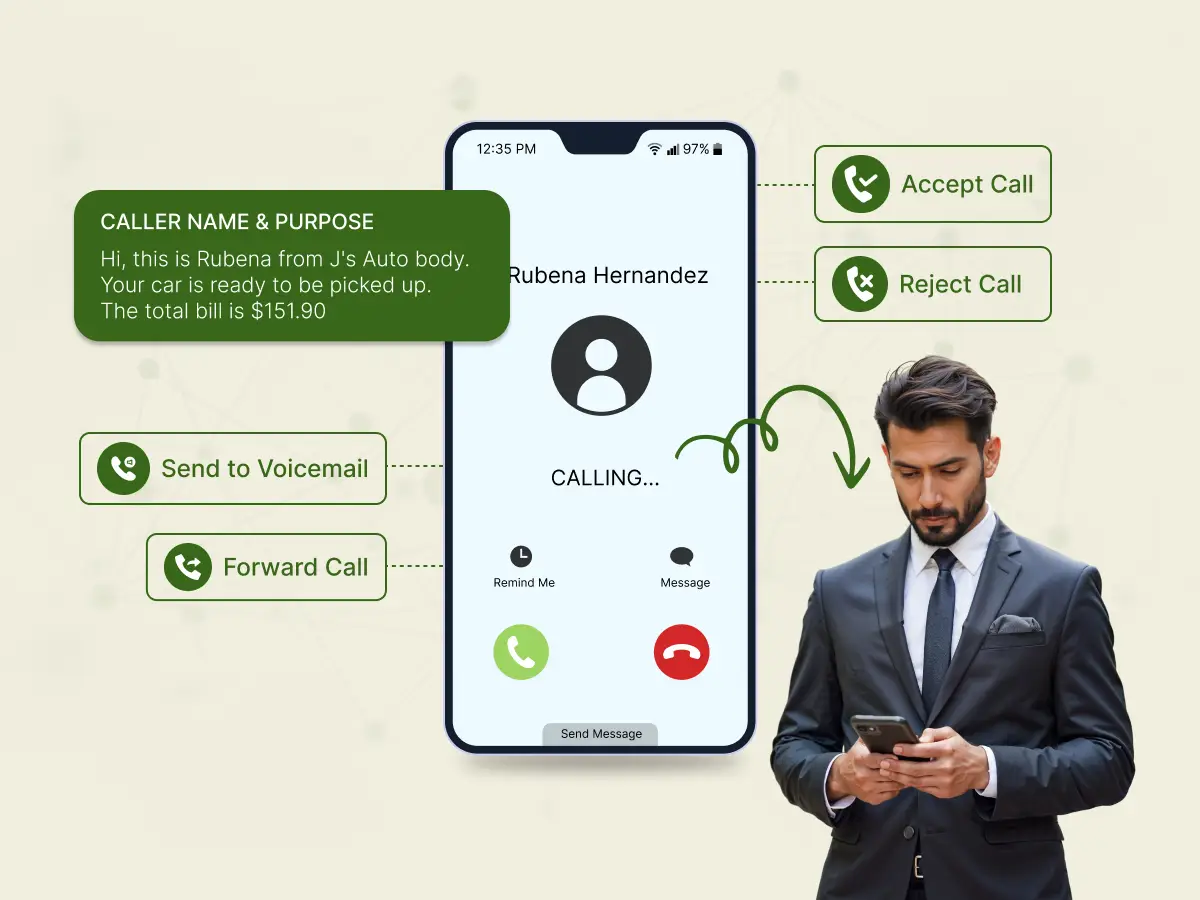
Most businesses answer every call that comes through, hoping it’s a customer ready to buy. Meanwhile, employees waste their valuable time dealing with robocalls, telemarketers, and misdirected calls that go nowhere.
This happens dozens of times across businesses every single day.
Spam calls, wrong numbers, and irrelevant calls eat up hours that could go toward serving real customers or finishing important projects.
Call screening fixes this problem by filtering who reaches your team before the phone even rings.
Call screening acts as a filter for your incoming calls, letting you identify who is on the line before you answer. It uses Caller ID and real-time data to help you decide whether to accept the call, decline it, or send the person straight to voicemail.
It is essentially a gatekeeper for your phone. Instead of blindly answering unknown numbers, you get the details upfront.
Whether you are avoiding spam calls or waiting for an important client, this feature gives you back control, ensuring you only pick up calls that are worth your time.
Call screening/call vetting identifies who’s calling, but understanding what it actually does for your business requires looking at its core functions.
Think of call screening as an intelligent gatekeeper for your office phone lines. Its primary job is to manage the flow of communication so you don’t have to constantly check your phone for irrelevant interruptions.
First, it identifies unknown numbers by pulling up Caller ID information and checking CNAM databases. This lets you know who is calling, even if they are not in your contacts.
It also actively filters out spam calls and annoying robocalls, and ensures the spammers do not interrupt your focus.
Whenever a legitimate call goes through, the system lets users decide the next move. You may respond, reject, or forward the individual to the voicemail screening to confirm their purpose of calling initially.
For businesses, this helps ensure that VIP customers or urgent matters are connected to the right agents or department using established call routing rules, rather than getting lost in a general queue.
Finally, this feature will safeguard your productivity, so you can only pick up phone calls that are actually of importance to your workflow.
These features work together to create measurable advantages for your business operations.
When your team blindly picks up each and every ring, you are wasting time and money. Here is why adding a call screening service is a smart move for your daily operations.
Nobody likes a ringing phone that turns out to be a recorded message about a “legal matter.” Screening acts like a bouncer, actively blocking robocalls and spammers before they disturb your office.
Your agents save up their time on real discussions instead of hanging up on bots.
You cannot work profoundly when you are interrupted by the phone every ten minutes. By reducing these inefficient interruptions, your employees can indeed remain in their working process.
They cease to be manual gatekeepers and hence concentrate on what they were employed for.
Context is everything. When you see VIP customers calling, you know to pick up fast. If it is a specific support issue, you can send it straight to the right department.
It ensures clients feel valued by routing them to the right person without the hassle of being transferred three times.
Letting a hot lead go to voicemail often causes direct revenue loss. With proper screening, sales teams can spot a buyer versus a vendor instantly. Real business inquiries get answered live, while the low-priority cold calls can wait on voicemail.
Want missed calls to become opportunities? Explore how Dialaxy voicemail can help.
Scammers are getting smarter, often pretending to be banks or internal staff. Screening checks identity details first, making it much tougher for bad actors to trick your staff. It protects your businesses from social engineering attacks.
Even when you clock out, your company image needs to stay sharp. IVR tools and clear voice prompts guide late callers, giving them useful options instead of dead air. Your office phone lines sound professional, whether it is noon or midnight.
These features essentially stop the noise so you can get back to business.
Different businesses need different levels of control, which is why call screening comes in several forms.
Not all screening methods work the same way. Some rely on a human touch, while others let software handle the heavy lifting. Depending on your setup, here is what you can expect to use.
You hear the phone ring, glance at the Caller ID information, and make a judgment call. If you recognize the name or number, you pick up.
If not, you let it go. In a physical office, a receptionist or admin often acts as the manual screener, asking, “Who may I say is calling?” before transferring the call to an employee. It works, but it takes time.
Here, the phone system steps in as the first line of defense. By using an IVR (Interactive Voice Response), the system requires the caller to do something before reaching you.
You might set up Prompted Identification, where the caller has to state their name or press a specific number to connect. This is incredibly effective against robocalls because bots usually can’t follow those instructions.
Features like Anonymous call rejection also kick in here, automatically blocking numbers that hide their identity.
This is the modern standard found in newer VoIP systems and smartphones. AI spam detection runs in the background, checking incoming numbers against massive global databases to flag likely scammers instantly.
A favorite feature for many is Live Transcription. You can literally watch the caller’s words appear as text on your screen in real-time. It’s like peeking at a voice mail message while it’s being recorded, giving you the context to jump in or stay silent.
Think of this as “If this, then that” for your phone. You set specific call routing rules to handle different types of callers automatically.
For instance, Selective call appearance can ensure that calls from your VIP customers ring your desk phone and mobile app simultaneously, so you never miss them.
On the flip side, you can set conditional forwarding to send unknown numbers straight to voicemail after 5 PM, or use a “Block with message” rule that plays a polite rejection to specific area codes you don’t service.
Each type serves different needs depending on your call volume and business requirements.
While call screening, blocking, and filtering might sound similar, they are three different features. Let’s compare.
It is easy to use these terms interchangeably, but they actually perform very different jobs on your phone system. While they help manage incoming calls, knowing the difference ensures you set up the right features for your needs.
Here is a quick comparison:
| Features | Call Screening | Call Blocking | Call Filtering |
|---|---|---|---|
| Primary Goal | Identify the caller and let the user decide | Stop unwanted calls completely | Automatically sort and route calls |
| How It Works | Uses Caller ID and prompts | Checks numbers against a blocklist or spam database | Uses call routing rules (like time or location) to direct traffic |
| Caller Experience | They are asked to state their name or wait while you review | They hear a busy signal, a disconnected message, or nothing | They are sent to a department, IVR, or voicemail |
| User Involvement | High; user makes a real-time decision | None; system blocks automatically | Low; handled automatically via preset rules |
| Best Used For | Deciding if a call is worth answering | Stopping spam calls, robocalls, and harassment | Managing workflows and routing calls to the right agents |
In short, call blocking builds a wall against bad numbers, call filtering organizes the traffic flow, and screening call acts as the doorman, giving you the final say.
Understanding the differences helps you choose the right approach, but knowing how the screening process actually unfolds shows why it works so well.
Filtering unwanted calls happens quickly, usually in just a few seconds. Understanding the process helps you see why it’s effective at managing inbound calls.
When your phone rings, call screening kicks in before you answer. The system quickly grabs incoming calls, working across VoIP, mobile phones, and office lines to protect you from unwanted interruptions.
The system checks caller ID information against your blocklist and caller databases. It spots potential spam calls and robocalls while identifying legitimate customers or business contacts; all happening instantly while your phone rings.
For unknown callers, screening services can ask for their name and purpose. The system converts this to text so you can see who’s calling without picking up. Some systems even analyze voice patterns to catch potential scams.
You get simple options:
The whole thing wraps up in seconds. Callers might hear a brief prompt or short delay while you get enough information to make a quick decision.
Once you understand how the process works, setting it up becomes straightforward.
Here’s how to get call vetting running on your phone system.
Step 1: Log in to your admin dashboard:
Access your VoIP or cloud phone system.
Step 2: Enable call screening:
Turn on call filtering for incoming calls.
Step 3: Set caller ID rules:
Verify numbers using CNAM, CRM, or spam lists.
Step 4: Create screening rules:
Define how unknown, VIP, and flagged calls are handled.
Step 5: Configure routing & prompts:
Forward calls, send them to voicemail, block them, or ask callers to state their name.
Step 6: Whitelist trusted members:
Ensure important contacts always bypass screening.
Step 7: Test and monitor:
Place test calls, review logs, and adjust rules to keep screening accurate.
Your call vetting setup is now active and protecting your time. However, even a properly configured system can go wrong if you fall into these common traps.
Even good call screening software can backfire if you set it up wrong. Here are the mistakes that cause more problems than they solve.
Aggressive spam filters sometimes catch real customers by accident. If your system blocks too many numbers automatically, you’ll miss important calls from clients who need help or want to place orders.
Long IVR prompts with too many options frustrate callers. When your voice response menu has five levels and takes two minutes to navigate, people hang up before reaching anyone.
Your regular customers and vendors shouldn’t go through screening every time they call. Without a whitelist, VIP customers face the same barriers as unknown callers, which damages relationships.
No spam detection system is perfect. If you never check what got blocked, you won’t notice when legitimate calls end up flagged incorrectly or sent straight to voicemail.
Call screening rules need adjustments over time. Without checking your logs, you won’t know if customers are getting stuck, if certain prompts confuse people, or if your settings need updates.
These mistakes are fixable once you spot them. Check your call screening settings every few weeks and ask customers if they’ve had trouble reaching you. Small adjustments keep the system working properly.
But the bigger problem is skipping sorting callers entirely. The financial impact hits harder than most business owners realize.
Picking up the phone blindly isn’t just annoying, it’s expensive. When your team answers every ring without knowing who is on the other end, the costs add up faster than you realize.
Here is how letting every call through hurts your bottom line:
Screening calls isn’t just about convenience; it is a necessary safeguard for your team’s focus and your company’s profit margins.
Next, you’ll also need to stay compliant with privacy regulations while doing it.
Follow these steps to keep screening calls legal, secure, and respectful of customer privacy.
| S. No. | Call Screening Checklist | ✅ |
| 1. | Inform callers that screening may record or log their call. | |
| 2. | Ensure caller data is handled securely (GDPR/CCPA compliance). | |
| 3. | Comply with TCPA or local robocall regulations. | |
| 4. | Obtain explicit consent if calls are recorded. | |
| 5. | Define retention rules for call logs and transcripts. | |
| 6. | Maintain a whitelist of trusted numbers. | |
| 7. | Allow opt-outs or preference management for screened calls. | |
| 8. | Regularly audit screening rules and logs. | |
| 9. | Ensure cross-border call compliance for international calls. | |
| 10. | Verify caller ID rules comply with local regulations (STIR/SHAKEN, etc.) | |
| 11. | Encrypt call recordings, logs, and transcripts. | |
| 12. | Restrict access to screened call data to authorized staff. | |
| 13. | Document call screening policies and procedures. | |
| 14. | Have an incident response plan for compliance breaches. | |
| 15. | Confirm third-party vendors comply with privacy and screening regulations. |
Here are the essential features to look for when upgrading your phone system.
Look for systems that include most of these features rather than just basic caller ID. The right combination turns your office phone lines into an actual business tool instead of just a way to receive calls.
Different industries apply these features in unique ways based on their specific challenges and caller types.
Call screening technology has evolved from simple caller ID to sophisticated AI-powered systems that help organizations manage incoming calls efficiently. Here’s how different industries leverage screening calls to improve operations and customer service:
Medical offices face high call volumes from patients, pharmacies, insurance companies, and other providers. Sorting callers helps by:
Many practices now use phone apps that integrate with electronic health records, allowing staff to see patient information alongside incoming call data for more personalized services.
Law firms deal with sensitive client information and need to manage their time efficiently. Screening incoming calls benefits legal practices by:
Legal call screening systems often integrate with case management software to provide context for each call, helping attorneys prepare before answering.
For service businesses, every missed call represents potential lost revenue. Screening calls helps by:
Many HVAC companies use call screening software that integrates with their scheduling systems, allowing for immediate appointment booking during the screening process.
Online retailers use screen inbound calls to improve customer service efficiency:
Some retailers now use QR codes on packaging that customers can scan to reach specific support teams, bypassing traditional screening processes.
Government offices handle diverse citizen inquiries and need efficient call management:
Screening phone calls helps public offices organize incoming calls and serve residents more efficiently.
These industry examples show how versatile screening calls become when adapted to specific workflows and caller patterns.
While many people know call screening from their personal phones, business versions work differently and offer capabilities that consumer apps don’t.
| Feature | Personal Smartphones | Business Phone Systems |
|---|---|---|
| Purpose | Reduce spam and unwanted interruptions | Manage high call volumes, route important calls, and protect sensitive information |
| Caller Identification | Caller ID and basic spam warnings | Matches callers with CRM, displays customer information, and verifies identity |
| Spam & Fraud Protection | Basic spam detection, limited spoof protection | Advanced filtering, fraud detection, blocks robocalls, and spoofed numbers |
| Custom Screening Rules | Minimal (block or silence) | Flexible rules for VIPs, unknown callers, flagged numbers, and departments |
| Call Routing | Goes to phone or voicemail | Reroutes to teams, agents, or IVR menus based on caller identity |
| Time-Based Handling | None or basic Do Not Disturb | Rules for business hours, after-hours, and holidays |
| Integration with CRM/Systems | None | Integrates with CRM, ticketing, or support systems |
| Scalability | Single user | Teams, departments, or multi-location businesses |
| Best For | Personal use, reducing spam | Businesses handling multiple callers and requiring professional call management |
| Key Takeaway | Good for personal convenience, but limited functionality | Essential for businesses; ensures efficiency, customer satisfaction, and compliance |
Unwanted calls are an actual problem in the business world. In the U.S. alone, studies reported that people received robocalls exceeding 52.5 billion in 2025, a larger share of which targeted businesses and individuals.
Research shows that about 72.1% of patients prefer phone calls to schedule medical appointments, compared with other communication methods. This fact points to the importance of call screening to prioritize urgent patient calls to reduce their waiting time, especially during peak hours.
In retail and service industries, phone calls remain the top medium for communication. A good 57% of customers rank phone support as their preferred method to reach out to businesses, despite the growth of other channels.
By screening calls, support teams can easily and quickly route customers to the right agent or department.
Together, these findings show that call screening isn’t just a nice-to-have feature; it addresses real challenges in businesses today.
Call screening turns your phone system from a source of constant interruptions into something that actually helps your business run better. The setup takes some effort upfront, but once your rules are working, you’ll wonder how you managed without it.
Start by enabling basic caller ID filtering and spam detection. Add features as you learn what your team needs. Test different configurations until calls flow smoothly without blocking the people who matter.
Stop wasting time on robocalls. Check your current phone system settings today and turn on call screening features you’re already paying for.
Phone call screening is a feature that identifies who’s calling before you answer. The system checks caller ID information, filters spam calls, and lets you decide whether to pick up, send to voicemail, or block the number.
No. Call blocking stops specific numbers completely, while call screening evaluates each incoming call and gives you options. Screening is more flexible since you can still answer screened calls if needed.
Yes, businesses can legally screen calls. Just follow privacy laws in your area and inform callers if you’re recording conversations. Basic caller ID screening doesn’t require special consent.
Absolutely. Most VoIP phone systems and business phone apps include call screening features at affordable prices. Even basic versions help small teams manage calls better without hiring extra staff.
